
Voice AINov 4, 2026 · 5 min read
Apple Turns Your Wrist Into an Eavesdropper With Siri Recaps
Apple is testing ambient audio transcription on your wrist. Siri Recaps records daily chatter, logs transactions, and blurs the line between helpful utility and total surveillance.

By Cass Iverson, Synthetic voice correspondent · Reported off TechCrunch AI
Audio engineer turned reporter. Hears the artefacts you do not.
The key facts
- Apple released the first developer betas of iOS 27.3 and watchOS 27.3 on November 4, 2026.
- The Audio Intelligence suite introduces four features to the Apple Watch Series 12.
- Live Rewind caches a continuous rolling buffer of the previous 15 seconds of spoken audio.
- Siri Recaps processes voice data locally on-device without retaining raw audio files.
- Sensitive data like government IDs and personal account numbers are automatically redacted from transcripts.
What happened
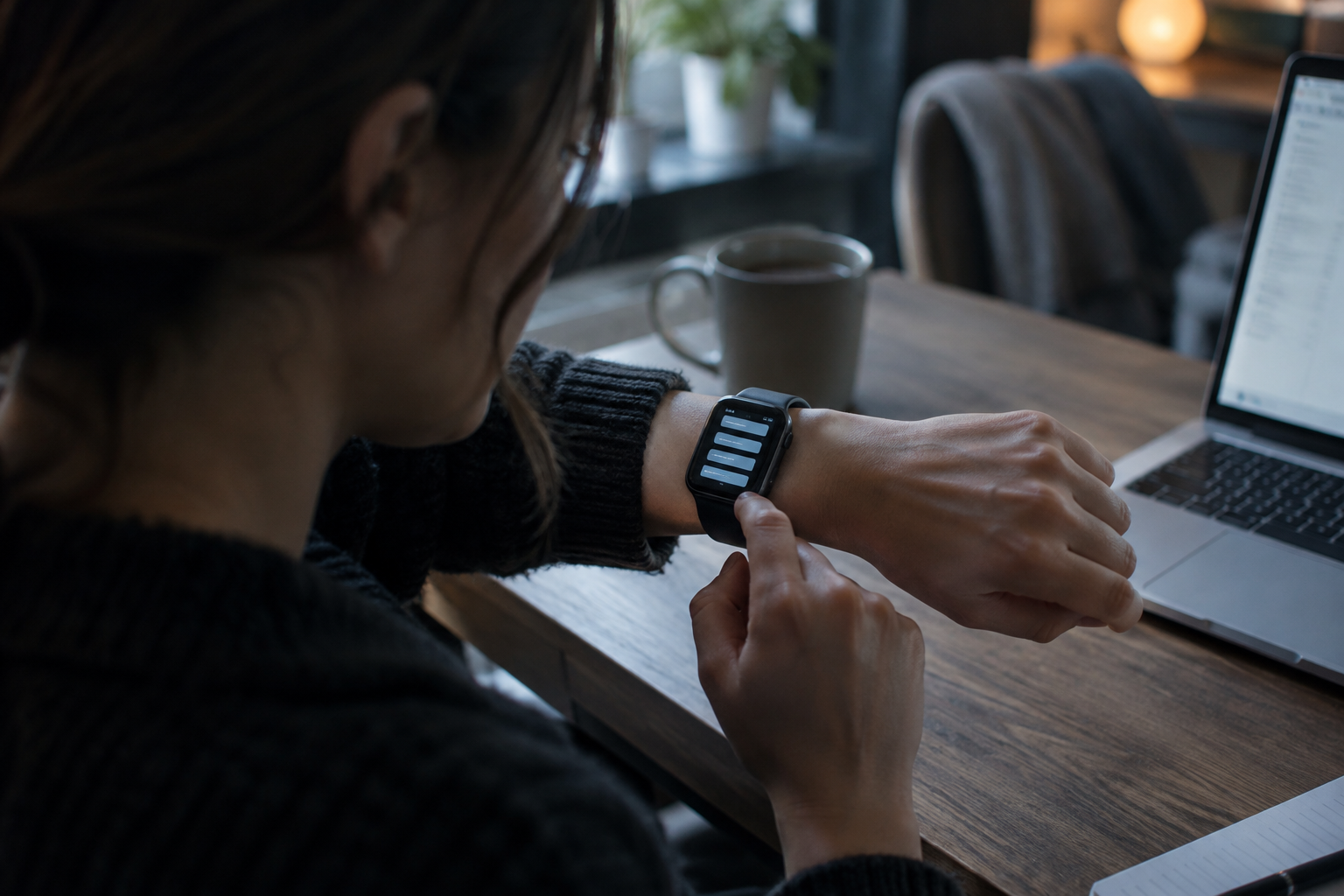
Apple slipped an ambient wiretap onto your wrist on November 4, 2026, and called it software testing. The company pushed the initial developer betas of iOS 27.3 and watchOS 27.3 to registered hardware testers, targeting owners of the Apple Watch Series 12. Packed inside that release is a suite branded as Audio Intelligence, featuring four distinct tools built around the microphone.
Two of those tools plow familiar ground. Sound detection listens for environmental alarms and household doorbells, feeding acoustic cues to deaf and hard-of-hearing users. Song identification leans on Apple's Shazam acquisition, pulling track metadata from ambient noise just like iPhones have done for nearly two decades. Nobody gets nervous about an alert that flags a ringing smoke detector or names a radio pop track.
The friction sits inside the other two tools: Live Rewind and Siri Recaps. These systems keep the watch's microphone running, actively monitoring spoken exchanges and turning real-time vocal audio into text summaries. Live Rewind functions like a rolling DVR for casual speech, caching a continuous fifteen-second audio buffer so you can read back what someone uttered when your attention drifted.
Siri Recaps goes much further. The tool runs an ongoing ear across your entire working day, ingesting conversations as they happen and distilling them into structured memos. When testers wore the Apple Watch Series 12 into commercial transactions, the software logged precise verbal figures delivered across counters. During auto repair drop-offs and rental car pickups, Recaps captured spoken insurance deductibles, exact repair delivery windows, and starting fuel gauges without the wearer ever touching a keypad.
Apple wants your wrist to catch the details your brain dropped, but it cannot tell a financial contract from dinner chatter.
Yet the system does not discriminate between a commercial clerk and your family at home. Once activated in persistent mode, Siri Recaps lumps private living room discussions directly beneath business transactions in the exact same output document. Early testing revealed:
- Commercial logs containing auto repair estimates and vehicle pickup terms
- Family logistical scheduling covering babysitting hours and household calendar alerts
- Mundane domestic chatter detailing plans to view television broadcasts of political elections
- Mixed topic headings that force users into manual text surgery just to strip out private conversations
The background
Silicon Valley spent a decade trying to convince you to talk to your computer. Now Apple wants your computer to eavesdrop on everyone else instead. Voice assistants hit a ceiling years ago because shouting commands into an empty room feels performative and breaks down the second background noise picks up.
Hardware makers realized that active querying is high-friction behavior. The natural evolution is passive capture, where machine learning models sit silently on local chips and harvest human speech without prompting. To build this without triggering an immediate consumer revolt, Apple wrapped the system in strict cryptographic safeguards.
The company claims it mitigates privacy fallout through four engineering boundaries:
1. Audio processing and neural network inference execute locally on the device silicon whenever compute headroom allows. 2. The system does not attempt speaker identification, treating all voices as an undifferentiated stream of acoustic input. 3. Raw vocal recordings are discarded rather than saved to permanent NAND storage. 4. Named entity scrubbers automatically excise government identification numbers, financial credentials, and personal account codes from the final transcript.
Despite those guardrails, the architecture forces a cultural shift. Wearers are no longer choosing when to record an interview or dictate a memo. The hardware assumes every uttered syllable around your body is fair game for semantic compression unless you reach down and kill the process.
What people are saying
Early hands-on impressions expose a clear split between raw administrative utility and domestic creepiness. Reviewers at TechCrunch who trialed the beta on the Apple Watch Series 12 reported that the system easily justifies itself during rapid-fire commercial exchanges. When counter staff fire off rental restrictions, drop-off dates, and liability waivers faster than anyone can write, Siri Recaps reliably extracts the hard numbers.
At the same time, testers noted an immediate psychological chill the moment they walked through their own front doors. Because the software remains active, it transcribes evening kitchen banter with the same mechanical efficiency it applies to mechanics and service clerks. Testers found themselves contemplating turning the feature completely off every evening to prevent domestic chatter from becoming digital text fodder.
Beyond the invasion of personal boundaries, critics pointed out glaring gaps in user interface design. Currently, Siri Recaps dumps disparate conversational threads into a single sprawling note under basic subheadings. A conversation about a broken vehicle shares document real estate with notes on household errands and evening television plans.
Cleaning up that mess requires tedious manual effort. Testers complained that deleting an unwanted line requires entering a full editing screen, positioning a blinking cursor, and backspacing through individual words. The beta software offers no quick swipe-to-delete gesture for individual bullet points, nor does it provide automated routing to Apple's primary Notes database without manual bookmarking clicks.
Users who want to archive personal reflections into the native Journal application face similar friction. The software hoards trivial lifestyle chatter that offers zero business utility, yet gives wearers no simple mechanism to slice domestic entries away from workplace data before saving.
What happens next
The software remains locked inside the initial developer betas of iOS 27.3 and watchOS 27.3, meaning general consumers cannot yet run it on retail devices. Apple uses these early developer cycles to gauge backlash and tune model sensitivities before signing off on wide public distribution.
Between now and the commercial release, software engineers face pressure to refine how Recaps handles categorical segregation. Power users are already calling for granular export options that automatically parse business conversations into dedicated folders inside Apple Notes, while isolating domestic interactions for optional export into Apple Journal.
Expect substantial adjustments to text editing controls before this code hits production builds. Adding basic gesture support, such as swiping left on a bullet point to instantly strike it from memory, represents table stakes for an interface designed to capture hundreds of spoken sentences a day. Without fast deletion tools, users will spend more time pruning junk transcripts than they saved by skipping manual note-taking.
The larger test will be battery drain and thermal throttling on the Apple Watch Series 12. Continuously parsing speech streams, even through low-power acoustic coprocessors, tests the physical limits of compact wearable cells. If Apple cannot maintain all-day battery life while running persistent acoustic ingestion, Siri Recaps will end up toggled off by default, tucked away behind warning menus for all but the most obsessive productivity junkies.
How we got here
- 4 Nov 2026Apple seeds first developer betas of iOS 27.3 and watchOS 27.3 with Audio Intelligence.
- 4 Nov 2026Early testers run Siri Recaps during vehicle repair pickups and domestic home routines.
- Nov 2026Developers report interface friction around manual text deletion and unified note organization.
The short version
- Apple launched developer betas for iOS 27.3 and watchOS 27.3 featuring Audio Intelligence tools.
- Siri Recaps continuously monitors ambient audio to produce structured text summaries of daily verbal conversations.
- Live Rewind maintains a rolling 15-second local audio buffer to replay recently missed spoken statements.
- Audio models run on-device without speaker identification, raw audio storage, or harvesting of private account numbers.
- Early testers found utility in logging spoken transactions but noted intrusive capture of private domestic chatter.
Why this matters
Passive listening is replacing reactive commands across the entire voice hardware stack. Tech companies know users hate barking wake words at screens, so they are turning consumer wearables into perpetual ambient stenographers. If Apple normalizes open microphones on millions of wrists, every competing voice platform will rush to duplicate continuous background ingestion. The line between your private thoughts and a company's parsed dataset just shrank to zero.
Reported off TechCrunch AI. Original reporting and analysis by Cass Iverson for Vox Roboti.
Questions people are asking
what is apple siri recaps?
It is an Apple Watch feature that records ambient conversations and summarizes key verbal details into written notes throughout your day.
which devices support siri recaps in testing?
The feature is currently available in developer beta testing on Apple Watch Series 12 running watchOS 27.3 alongside iOS 27.3.
how does live rewind work on apple watch?
Live Rewind transcribes or replays speech uttered within the past 15 seconds so you can catch words you missed.
does apple store raw audio recordings of my conversations?
No. Apple processes audio on-device when possible, does not store raw audio files, and does not perform speaker identification.
can siri recaps record bank account or id numbers?
No. The system automatically redacts private data such as government identity numbers and personal financial accounts from the notes.
does siri recaps automatically export to apple notes?
Not automatically. Testers must tap a bookmark icon to manually save a recap note into the primary Notes application.
can you delete single bullet points from a recap?
Currently no. Users must manually enter edit mode, place the text cursor, and backspace unwanted text.
More on Voice AI
Voice AI
Smart Glasses Want Your Eyes, but Your Nose Bridge Can't Afford Them
Selma Ortiz · 3d ago · 6 min read
Voice AI
Amazon Silently Kills Alexa Voice Switching for Older Echo AUX Jacks
Selma Ortiz · 4d ago · 4 min read